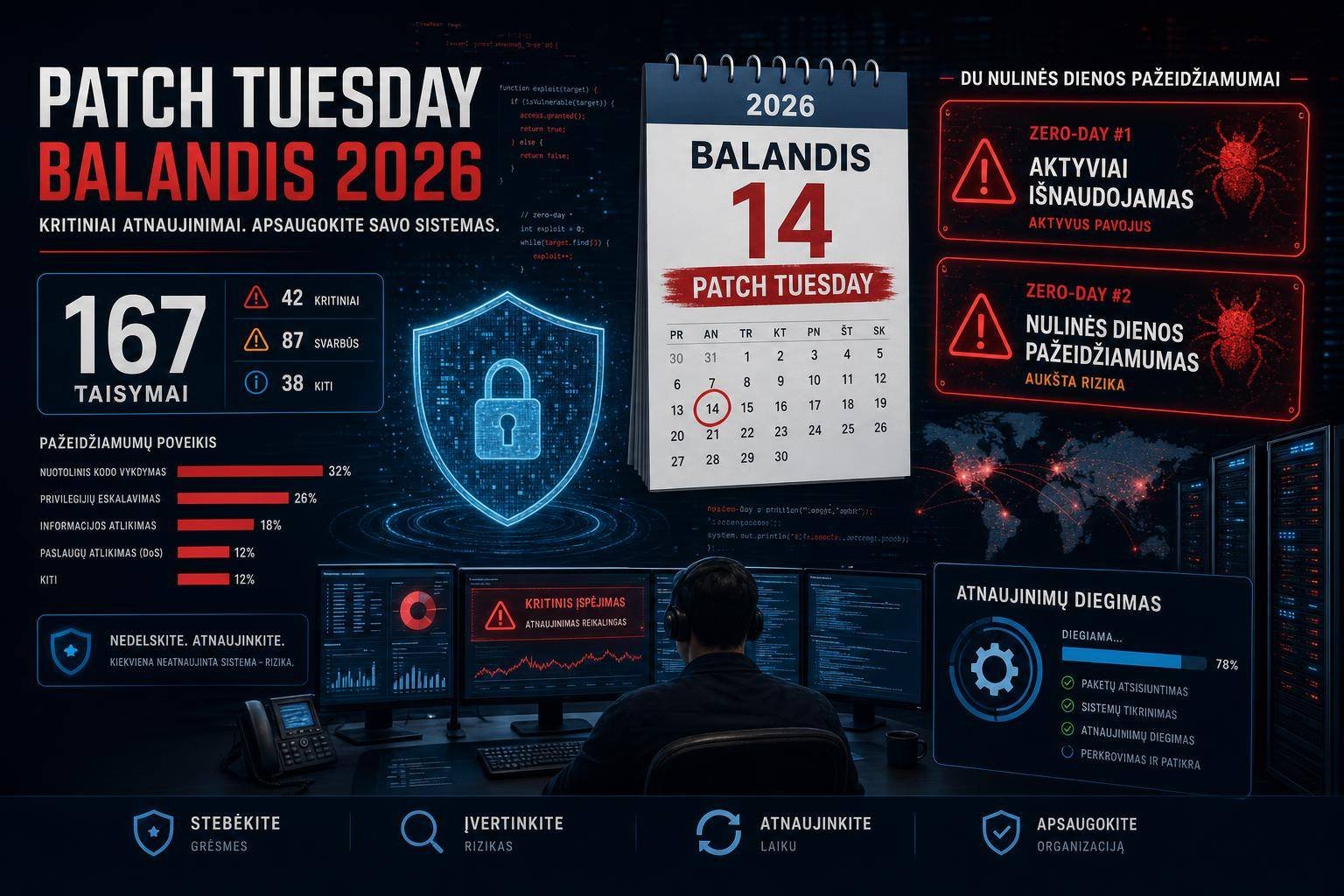
Microsoft’s April 2026 Patch Tuesday: Two Zero‑Days (One Exploited) and 167 Fixes — What Security Teams Must Do Now
Microsoft’s April 2026 Patch Tuesday drops with urgency: 167 vulnerabilities fixed, two zero-days raised to the top of your queue, and one already being exploited in the wild. For IT and security leaders juggling uptime, compliance, and risk, this is the sort of release that separates mature patch programs from fire drills.
The two headline issues—CVE-2026-32201 in Microsoft Office SharePoint (spoofing; actively exploited) and CVE-2026-33825 in Microsoft Defender’s anti-malware platform (elevation of privilege; publicly disclosed)—make an effective one-two punch for adversaries. One can help initial access and trust abuse; the other can flip a foothold into complete system takeover.
This guide breaks down what’s in the April 2026 Patch Tuesday, why these zero-days demand immediate action, how to prioritize and roll out updates safely, and what compensating controls reduce risk if you can’t patch today. You’ll also find practical validation steps, detection ideas, and governance guidance aligned to accepted frameworks and official documentation.
April 2026 Patch Tuesday at a glance
- 167 vulnerabilities fixed across Microsoft’s product stack.
- Two zero-days require immediate attention:
- CVE-2026-32201 (CVSS 6.5): SharePoint spoofing vulnerability. Improper input validation allows network-based spoofing with no user interaction. Confirmed as under active exploitation.
- CVE-2026-33825 (CVSS 7.8): Microsoft Defender anti-malware platform elevation of privilege (EoP). Local attackers can escalate to SYSTEM, enabling full control, defense evasion, persistence, and lateral movement.
Microsoft’s Patch Tuesday cadence remains the cornerstone of enterprise vulnerability management. Use the Microsoft Security Update Guide to track affected products, advisories, and any released mitigations or known issues. Organizations subject to regulatory oversight should also watch the CISA Known Exploited Vulnerabilities (KEV) Catalog to see if either CVE is added, which can trigger mandated remediation timelines.
Who is most at risk right now
- Enterprises running on-premises SharePoint (including Internet-facing instances) with broad access to line-of-business sites and workflows.
- Any Windows estate relying on Microsoft Defender where a local user or dropped implant could try to elevate to SYSTEM.
- Hybrid environments where a Defender EoP can be paired with credential theft to move from user workstations into on-prem servers or cloud connectors.
Zero‑day #1: SharePoint spoofing (CVE‑2026‑32201) — what’s exploitable and why it matters
CVE-2026-32201 is an improper input validation issue in Microsoft Office SharePoint that enables spoofing over the network without user interaction. Spoofing vulnerabilities allow attackers to impersonate users or services, manipulate identity- or trust-based checks, or craft deceptive content that appears legitimate.
Why that’s dangerous in SharePoint: – SharePoint often brokers collaboration, documents, and workflows tied to sensitive data. – Many enterprises integrate SharePoint with other services via connectors, automation, or custom web parts. Trust assumptions travel across those seams. – Spoofing can set up phishing or business email compromise (BEC)-style attacks where SharePoint pages or alerts appear trusted, or it may facilitate bypassing certain policy gates.
This vulnerability is already being exploited. Treat Internet-exposed or partner-accessible SharePoint as high-risk. If you administer SharePoint Server, combine patching with a quick review of external access pathways, especially legacy or custom integrations. For foundational guidance, Microsoft’s security hardening for SharePoint Server is a helpful reference when re-checking your posture.
Practical exposure notes
- Internet-facing SharePoint increases blast radius. If you publish SharePoint via reverse proxy or VPN portals, validate URL rewriting, authentication brokers, and extra headers (e.g., to prevent header spoofing).
- Custom page templates and workflow automation can magnify spoofing effects. Review custom solutions, and temporarily restrict high-risk automations if needed while patching.
Zero‑day #2: Microsoft Defender EoP (CVE‑2026‑33825) — from local user to SYSTEM
CVE-2026-33825 is an elevation of privilege vulnerability in Microsoft Defender’s anti-malware platform. Local attackers can escalate to SYSTEM—Windows’ highest privilege level.
Why EoP often matters more than a headline severity: – SYSTEM-level control means attackers can disable or tamper with security tools, hide processes, and install kernel-level persistence. – It enables credential theft and token manipulation that fuel lateral movement and domain compromise, consistent with MITRE ATT&CK Privilege Escalation (TA0004) and subsequent tactics such as Lateral Movement (TA0008). – Public disclosure lowers the barrier for exploitation by making techniques more discoverable, scriptable, and replicable across environments.
Defender is ubiquitous on modern Windows systems, so even if exploitation requires local access, the ubiquity plus payoff (SYSTEM) makes this a high-priority fix. Organizations relying on Defender EDR controls should verify Tamper Protection is enabled across all devices while updates roll out.
For enterprise controls and update mechanics, see Microsoft’s guidance on managing Microsoft Defender Antivirus platform and engine updates.
Typical attack chain this EoP can accelerate
- Initial foothold via phishing, macro-abused documents, a browser or driver exploit, or a misconfigured service.
- Local code execution with user-level privileges.
- Abuse of CVE-2026-33825 to escalate to SYSTEM and disable defenses.
- Credential harvesting, token impersonation, and discovery.
- Lateral movement to high-value targets, often culminating in data theft or ransomware deployment.
Prioritize, patch, prove: a practical operations playbook
When Patch Tuesday lands with active exploitation and a Defender EoP, speed and discipline matter. Here’s a structured approach aligned to mature vulnerability management practices and NIST SP 800-40.
1) Inventory and exposure mapping
- Identify all SharePoint instances (on-premises servers, farms, and any exposed endpoints). Flag Internet-facing nodes and those hosting sensitive sites.
- Map Windows endpoints and servers running Microsoft Defender. Include VDI pools, jump hosts, and build servers that may be off the usual cadence.
- Pull “crown jewels” and Tier 0 assets (domain controllers, identity providers, PKI) into the highest-priority patch ring.
2) Prioritize based on risk, not only CVSS
- CVE-2026-32201: Prioritize any Internet-exposed SharePoint first, then internal SharePoint hosting sensitive content or custom solutions.
- CVE-2026-33825: Prioritize devices most likely to be used as pivots (IT admin workstations, shared terminal servers, remote gateways) and those with broad lateral access.
3) Establish deployment rings with fast feedback
- Ring 0 (canary): Small set of non-critical systems mirroring critical roles. Deploy within hours.
- Ring 1: Security team endpoints, IT ops, and lab servers. Deploy next day.
- Ring 2+: Business-critical workloads. Expand after validation gates pass.
You can orchestrate with Configuration Manager, WSUS, Azure Update Manager, or Windows Update for Business. For policy-based Windows servicing on modern fleets, see Windows Update for Business/Intune update rings.
4) Patch acquisition and staging
- Use the Microsoft Security Update Guide to confirm affected versions and any prerequisite KBs.
- For SharePoint farms, follow Microsoft’s recommended patch sequence: quiesce services, update all nodes, run configuration wizards, and re-balance.
- For Microsoft Defender, confirm both platform/engine and signature updates. Defender’s platform updates may require a reboot; coordinate with maintenance windows as needed.
5) Verification and health checks
- SharePoint:
- Validate farm health and services state.
- Test authentication flows and custom solutions on representative site collections.
- Review ULS logs for elevated error rates or failed claims processing.
- Microsoft Defender:
- On endpoints, run:
- PowerShell: Get-MpComputerStatus | Select AMEngineVersion, AMProductVersion, AntivirusSignatureVersion
- Verify real-time protection, cloud-delivered protection, and Tamper Protection are enabled.
- Run a quick scan and EDR sensor health check.
6) Communication and change controls
- Notify business owners of short, defined maintenance windows—especially for SharePoint.
- Document pre/post-change validation steps and roll-back criteria.
- Track exceptions where patching is deferred; apply compensating controls (see below) and set a remediation deadline.
7) Post-deployment monitoring
- Watch for noise: spikes in Defender or SharePoint alerts can indicate probing or residual issues.
- Confirm no unusual drop in event volume from Defender sensors (a red flag for tampering).
- Feed patch status into your risk dashboard and compliance reports.
If you can’t patch today: high-value compensating controls
While patching is non-negotiable, some organizations need added guardrails in the interim. Apply the following defense-in-depth controls, then patch as soon as feasibly possible.
For SharePoint (CVE‑2026‑32201)
- Restrict exposure:
- Remove or limit Internet-facing SharePoint endpoints where possible.
- Require VPN or ZTNA-based access with device posture checks.
- Harden identity and trust:
- Enforce multifactor authentication (MFA) for SharePoint access.
- Tighten conditional access policies and session controls.
- Web-tier protection:
- Place SharePoint behind a reverse proxy/WAF with strict header validation and request filtering.
- Increase logging and alerting for unusual URL parameters or API calls.
- Least privilege and hygiene:
- Audit site collection admins and external sharing settings.
- Disable or isolate high-risk custom web parts and unmaintained third-party add-ons.
Reference: Microsoft’s SharePoint Server security hardening.
For Microsoft Defender (CVE‑2026‑33825)
- Guard the guards:
- Ensure Defender Tamper Protection is enabled tenant-wide to block unauthorized setting changes. See Tamper Protection in Microsoft Defender.
- Enforce EDR in block mode where compatible to stop post-exploitation behavior even if primary AV is disabled.
- Reduce privilege escalation blast radius:
- Remove local admin rights from standard users; validate privileged access workstations (PAWs) for admins.
- Deploy Windows LAPS to randomize local admin passwords and prevent reuse. See Windows LAPS overview.
- Constrain untrusted code:
- Enable Attack Surface Reduction (ASR) rules and application control on high-risk devices. Microsoft details ASR rule options in Defender for Endpoint attack surface reduction.
- Block unsigned or untrusted drivers and scripts via WDAC or AppLocker policies where feasible.
- Visibility and alarms:
- Alert on Defender service restarts, configuration changes, or reductions in telemetry volume from endpoints.
- Increase monitoring of process creation, driver loads, and persistence mechanisms.
For update pathways and validation across diverse device profiles, lean on Defender platform/engine updates documentation.
Detection and threat hunting ideas
Even with rapid patching, assume some adversaries will test your edges. Aim for layered detection along the likely attack path.
SharePoint spoofing signals
- Authentication anomalies:
- Surges in authentication token errors or unusual claims transformations.
- Access attempts with atypical user agents or geographies tied to SharePoint endpoints.
- Content manipulation:
- Creation or modification of pages in critical site collections by unusual identities or at odd hours.
- Abnormal spikes in alert or notification emails originating from SharePoint.
Correlate SharePoint logs (ULS, IIS) with your SIEM. If you front SharePoint with a WAF or reverse proxy, ingest and correlate its logs for request patterns hinting at input tampering.
Defender EoP signals
- Tampering and evasions:
- Alerts indicating changes to Defender settings, failures to start core services, or policy mismatch against your baseline.
- Sudden stops in expected Defender or EDR telemetry from a subset of hosts.
- Privilege escalation behaviors:
- Processes spawning with SYSTEM privileges from non-admin user contexts.
- Abnormal service creation, driver loading, or registry persistence tactics aligned with MITRE ATT&CK Privilege Escalation.
- Lateral movement staging:
- Unusual authentication attempts to admin shares (C$, ADMIN$) or remote service/PowerShell usage.
- Credential dumping detections or LSASS access attempts across endpoints.
Pair detections with automated containment (isolation, account disablement) where your tooling allows, especially during the high-risk window between disclosure and full patch saturation.
Governance and risk context: turning Patch Tuesday into durable risk reduction
Treat Patch Tuesday as a forcing function for continuous improvement, not just a monthly sprint.
- Repeatable process over heroics:
- Codify SLAs by severity and exposure (e.g., exploited or public zero-day on Internet-facing or Tier 0 systems patched within 48–72 hours).
- Align playbooks with NIST SP 800-40 patch management principles to balance speed, testing, and assurance.
- Measure what matters:
- Track time-to-patch, exception counts, and residual risk windows for zero-days.
- Distinguish coverage (percentage of devices offered an update) from actual compliance (percentage successfully updated and verified).
- Map to threat outcomes:
- Tie zero-day response to adversary tactics to keep priorities sharp. For example, mitigation of a Defender EoP should immediately reduce the probability of privilege escalation and lateral movement.
- Close the loop:
- Feed lessons learned to architecture (e.g., segment SharePoint, reduce local admin exposure, standardize ASR rules).
- Budget for modern management tooling and automations that shrink the patch-to-protect gap.
Implementation checklist: get from knowledge to action fast
Use this condensed list to drive execution over the next 72 hours.
- Confirm scope – Enumerate SharePoint servers and critical Windows endpoints/servers. – Tag Internet-exposed and Tier 0 assets.
- Activate controls – Ensure Defender Tamper Protection is enforced. – Tighten SharePoint access (MFA, conditional access, reduce public exposure).
- Deploy updates – Push April 2026 cumulative updates to canary ring now, then expand. – Update Defender platform/engine alongside OS updates.
- Validate – SharePoint farm health, authentication flows, and custom solution checks. – On endpoints: verify Defender status and versions via Get-MpComputerStatus.
- Monitor and hunt – Watch for spoofing attempts against SharePoint. – Alert on Defender tampering, privilege escalation, and lateral movement precursors.
- Document and improve – Record exceptions and compensating controls with deadlines. – Update patch SLAs, ring definitions, and automation jobs for next month.
FAQs
What is Patch Tuesday and why does it matter for April 2026?
Patch Tuesday is Microsoft’s monthly release of security updates. April 2026 matters because it includes 167 fixes and two zero-days—one actively exploited and one publicly disclosed—raising the urgency to patch quickly to reduce real-world attack risk.
Which systems should I prioritize for April Patch Tuesday?
Focus first on Internet-exposed or business-critical SharePoint servers for CVE-2026-32201, and on endpoints/servers most likely to be used for lateral movement or admin work for CVE-2026-33825 (Defender EoP). Tier 0 assets and remote access gateways should receive updates early.
How can I verify Microsoft Defender is fully updated?
Use PowerShell on endpoints: Get-MpComputerStatus | Select AMEngineVersion, AMProductVersion, AntivirusSignatureVersion. Also confirm real-time protection, cloud-delivered protection, and Tamper Protection are enabled. Refer to Microsoft’s Defender update guidance for versioning and channels.
What if I can’t patch SharePoint immediately?
Limit exposure (prefer private access via VPN or ZTNA), enforce MFA and conditional access, place SharePoint behind a WAF/reverse proxy with strict filtering, and temporarily disable or isolate risky custom solutions. Increase monitoring until updates are applied.
How does the Defender EoP lead to bigger breaches?
An attacker who elevates to SYSTEM can disable defenses, harvest credentials, and move laterally to higher-value systems, enabling data theft or ransomware. That’s why immediate patching plus strong endpoint controls (Tamper Protection, ASR, least privilege) are essential.
Will Microsoft 365/SharePoint Online be patched automatically?
Cloud services are serviced by Microsoft on their cadence. However, on-premises SharePoint servers require admin-applied updates. Always verify your tenant/service health notifications and ensure hybrid connectors and on-prem components are updated.
Conclusion: Treat April 2026 Patch Tuesday as a race to reduce real risk
This April Patch Tuesday isn’t just another maintenance window. With an actively exploited SharePoint spoofing bug (CVE-2026-32201) and a publicly disclosed Defender elevation of privilege (CVE-2026-33825), adversaries have both an entry tactic and a privilege amplifier at their disposal. The winning move is disciplined speed: prioritize the right systems, deploy updates in controlled rings, verify outcomes, and shore up defenses where patching takes longer.
Use the Microsoft Security Update Guide to track affected products, lean on CISA’s KEV Catalog to inform remediation SLAs, and operationalize guidance from NIST SP 800-40 to build a patch program that’s fast and reliable. If you do nothing else today, push patches to Internet-facing SharePoint servers and high-risk Windows endpoints, enforce Defender Tamper Protection, and enable ASR rules on admin and shared systems. That combination alone sharply reduces the most likely exploit paths stemming from April 2026 Patch Tuesday.
Discover more at InnoVirtuoso.com
I would love some feedback on my writing so if you have any, please don’t hesitate to leave a comment around here or in any platforms that is convenient for you.
For more on tech and other topics, explore InnoVirtuoso.com anytime. Subscribe to my newsletter and join our growing community—we’ll create something magical together. I promise, it’ll never be boring!
Stay updated with the latest news—subscribe to our newsletter today!
Thank you all—wishing you an amazing day ahead!
Read more related Articles at InnoVirtuoso
- How to Completely Turn Off Google AI on Your Android Phone
- The Best AI Jokes of the Month: February Edition
- Introducing SpoofDPI: Bypassing Deep Packet Inspection
- Getting Started with shadps4: Your Guide to the PlayStation 4 Emulator
- Sophos Pricing in 2025: A Guide to Intercept X Endpoint Protection
- The Essential Requirements for Augmented Reality: A Comprehensive Guide
- Harvard: A Legacy of Achievements and a Path Towards the Future
- Unlocking the Secrets of Prompt Engineering: 5 Must-Read Books That Will Revolutionize You