CISA Adds Actively Exploited Windows Shell and ConnectWise ScreenConnect Flaws to the KEV Catalog: Patch Deadlines, Threat Details, and a Defense Playbook
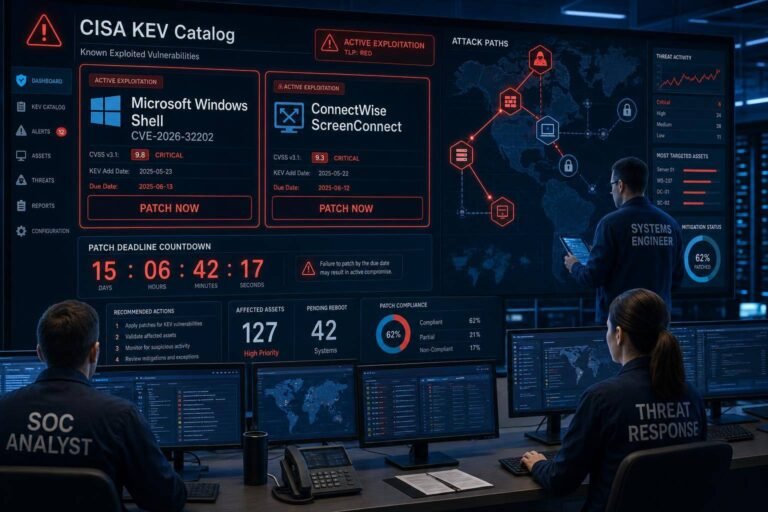
Two more actively exploited vulnerabilities just landed in CISA’s Known Exploited Vulnerabilities (KEV) catalog: a Windows Shell bug tracked as CVE-2026-32202 and an undisclosed ConnectWise ScreenConnect flaw. The additions, made on April 29, come with a fast-approaching federal patch-by deadline of May 12 and an unambiguous signal to enterprises everywhere: prioritize remediation and start hunting for signs of exploitation.
Why this matters now: Microsoft confirmed active exploitation of the Windows issue on April 28 and linked it to an incomplete fix of a prior zero-day exploited by a Russian state actor. Meanwhile, real-world abuse of ScreenConnect prompted CISA to move even without disclosing all technical details. That pairing—nation-state-grade tradecraft and mass-market remote management software—creates a high-likelihood, high-impact scenario across government and private networks.
This analysis breaks down what’s new in the KEV update, how authentication coercion works in Windows, why remote management tools continue to be prime targets, and the concrete steps security teams can take this week to reduce risk, detect ongoing compromise, and improve patch velocity across the board.
Why CISA’s KEV additions matter—and who must act by May 12
CISA’s KEV catalog is a living list of vulnerabilities confirmed to be exploited in the wild. It exists to accelerate remediation of real-world threats rather than theoretical risks, and it’s backed by policy teeth for U.S. federal civilian agencies.
- The catalog is maintained here: CISA Known Exploited Vulnerabilities Catalog.
- Federal Civilian Executive Branch (FCEB) agencies are mandated by Binding Operational Directive 22-01 to remediate KEV-listed flaws by CISA’s specified due date—in this case, May 12.
Even if you’re not in the public sector, KEV entries are strong indicators for risk-based prioritization. Security teams with limited patch windows or change control constraints should fast-track KEV vulnerabilities ahead of lower-likelihood CVEs. The cost of delay is rarely limited to a single endpoint: coerced authentication and remote management tooling frequently become initial access footholds, lateral movement highways, and persistence anchors in modern intrusions.
Breaking down the Windows Shell vulnerability (CVE-2026-32202): authentication coercion explained
CVE-2026-32202 is an “authentication coercion” issue in Windows Shell that attackers are actively exploiting. In plain terms, authentication coercion means tricking a Windows asset into attempting to authenticate to a location controlled by the attacker. When that happens, credentials (or credential-derived material) can be captured or relayed, enabling data exposure or account takeover without cracking passwords.
Microsoft tied the new exploitation to an incomplete patch for an earlier Windows zero-day that nation-state actors, including APT28 (Fancy Bear), abused in campaigns against Ukraine and EU targets. Researchers have pointed out that the initial fix did not neutralize the root cause, leaving room for attackers to adapt their methods and continue operations.
How forced authentication and network spoofing are abused
Forced authentication often shows up in several recurring patterns:
- UNC path tricks and WebDAV abuse: A user or process is coerced into loading a resource from a share like \attacker[.]host\share or a WebDAV path, prompting Windows to “helpfully” authenticate.
- Name resolution hijacking: Protocols such as LLMNR/NBT-NS can be poisoned so that a benign hostname resolves to a malicious IP, again triggering automatic sign-on.
- Relay attacks: Instead of simply capturing a hash, an adversary can relay an inbound authentication attempt to a legitimate service, performing actions as the victim user without knowing the password.
This isn’t new in principle—the techniques overlap with MITRE ATT&CK T1557 Adversary-in-the-Middle and common NTLM relay scenarios—but exploitation details change as Windows internals and mitigations evolve. Small oversights, like legacy protocol fallbacks or incomplete path validation, can have outsized impact under active exploitation.
For background on the protocols in play, see Microsoft’s documentation for NTLM authentication. Reducing NTLM usage, requiring SMB signing, and forcing modern protections such as channel binding and Extended Protection for Authentication (EPA) are among the most effective guards when coerced authentication techniques are in the mix.
Detection signals security teams should watch
Active exploitation usually leaves faint but detectable traces. Consider prioritizing these hunting leads while you patch:
- Authentication anomalies
- Spikes in NTLM authentication (especially to unfamiliar hosts or over HTTP/WebDAV).
- 4624 Logon Type 3 events from unusual workstations or with new target servers.
- 4648 “A logon was attempted using explicit credentials” from atypical processes.
- NTLM over HTTP/WebDAV
- Proxy logs or web server logs showing NTLM negotiation headers to non-corporate domains.
- SMB signing and policy drift
- Connections where SMB signing is not required when policy says it should be.
- Name resolution poisoning indicators
- LLMNR/NBT-NS queries answered by non-authoritative hosts; sudden spikes in 5355/137 traffic.
- Endpoint telemetry
- Windows Shell or office processes (explorer.exe, outlook.exe, winword.exe) initiating outbound SMB/WebDAV connections to untrusted IPs.
- Identity security products
- Alerts for NTLM relay patterns, suspicious Kerberos service ticket requests, or certificate enrollment anomalies.
Pro tip: If you’ve restricted NTLM usage via GPO, review audit logs to confirm whether exceptions or domain-level allow lists are quietly undermining your intended posture. Confirm that SMB signing is enforced end-to-end, not just “enabled if supported.” Microsoft’s overview of SMB security and signing provides a useful checklist for control hardening.
What we can infer about the new ConnectWise ScreenConnect exploitation
CISA’s move to list a ScreenConnect vulnerability without public technical details is a strong indicator that exploitation is already producing real impact. We’ve been here before: the remote monitoring and management (RMM) ecosystem—and ScreenConnect in particular—has faced serious, rapidly weaponized vulnerabilities in recent years. When adversaries compromise RMM infrastructure, they inherit reach and credibility across fleets of endpoints in one step.
Even without full CVE specifics, the priorities are clear:
- Patch to the latest ScreenConnect release available from the vendor.
- Audit for unauthorized users, sessions, and integrations.
- Rotate administrative credentials, revoke stale tokens, and reissue API keys.
- Review logs for anomalous remote sessions, lateral movement, and scripts deployed at scale.
ConnectWise maintains a central repository of product notices and guidance: ConnectWise Security Bulletins. Monitor this page alongside CISA’s KEV feed to ensure you’re not missing out-of-band advisories or mitigation notes.
Why RMM tools remain high-value targets
RMM platforms are ideal for both defenders and attackers. They are:
- Highly privileged by design, often whitelisted across EDR and network controls.
- Internet-exposed to support remote work and MSP workflows.
- Script-capable, enabling mass deployment of payloads or configuration changes.
- Frequently integrated with identity providers and ticketing systems, broadening the blast radius.
Threat actors also exploit user trust. When a remote session appears to originate from a known RMM console—and the operator identity matches a legitimate admin—end users are more likely to accept prompts, approve MFA, or overlook anomalies.
CISA has previously warned about the abuse of remote monitoring and management utilities in intrusion campaigns, including social engineering and living-off-the-land techniques. See: CISA alert on malicious use of RMM software.
Immediate actions to take in the next 72 hours
Speed matters. Here’s a prioritized playbook you can run in parallel across patching, monitoring, and containment.
1) Confirm exposure and prioritize patching
- Inventory affected assets:
- Enumerate Windows versions and roles most likely to trigger coerced authentication scenarios (file servers, terminal servers, systems processing untrusted content).
- Identify all ScreenConnect instances: on-prem servers, cloud tenants, and MSP-managed consoles.
- Apply updates:
- Deploy Microsoft’s latest cumulative updates across supported Windows builds. Validate that systems with historically problematic updates (VDI images, kiosk endpoints) are explicitly covered.
- Update ScreenConnect to the latest stable version across all instances. Don’t assume MSPs or third parties patched—verify.
- Validate post-patch state:
- Spot-check endpoints for the correct OS build numbers and patch levels.
- Confirm ScreenConnect server and agent versions match vendor guidance.
- Reboot endpoints where required; partial remediation without restarts often leaves gaps.
For tracking vendor updates and release notes, rely on official sources like Microsoft’s Security Update Guide (MSRC) and your ScreenConnect console’s update channel or the ConnectWise security bulletins page.
2) Tighten authentication and protocol controls
- Reduce NTLM attack surface:
- Enforce policies to restrict or block NTLM where operationally feasible. Start with servers and high-value assets.
- Require SMB signing; disable SMBv1 entirely; ensure mutual authentication where supported.
- Enable LDAP signing and channel binding; enable EPA on IIS and other web services consuming Windows auth.
- Disable weak name resolution:
- Turn off LLMNR and NetBIOS name resolution via GPO to limit spoofing avenues.
- Remove WPAD auto-detection in environments not using it; explicitly configure proxies.
- Control outbound exposure:
- Block outbound SMB (445/TCP) and related protocols to the internet at egress points.
- Alert on outbound WebDAV traffic to untrusted hosts.
- Harden user context:
- Eliminate domain admin use on workstations; require privileged access workstations (PAWs).
- Enforce phishing-resistant MFA for administrative roles; monitor for MFA fatigue patterns.
Microsoft’s NTLM and SMB hardening documentation provides configuration specifics for Group Policy and server roles: NTLM authentication overview and SMB security and signing.
3) Lock down ScreenConnect
- Access control:
- Require MFA for all operators and administrators.
- Enforce role-based access; remove shared or legacy admin accounts.
- Restrict access to the ScreenConnect administrative interface by source IP or VPN.
- Operational hygiene:
- Rotate credentials, tokens, and API keys tied to ScreenConnect. Invalidate stale sessions.
- Review and disable unused extensions or custom integrations.
- Audit all organizations/tenants for dormant agents and stale installers.
- Logging and monitoring:
- Centralize ScreenConnect logs into your SIEM.
- Baseline normal session patterns; alert on out-of-hours access, new device enrollment surges, or mass-scripting activity.
Security operations playbook: hunt for exploitation now
While patches roll out, assume exposure. Use the following hunting checklist to find evidence of coerced authentication or RMM abuse.
Hunt for authentication coercion and relay
- Network and proxy telemetry
- Query for NTLM authentication attempts to external IPs/domains over HTTP/WebDAV.
- Identify SMB connections to non-corporate IP ranges; prioritize servers and admin workstations as sources.
- Windows Security logs
- Event ID 4624 (Logon): Filter Type 3 with NTLM package; pivot on rare/new target servers.
- Event ID 4648: Explicit credentials used by unexpected processes or service accounts.
- NTLM auditing (if enabled): Review 8001–8004 events for NTLM usage and failures.
- EDR/endpoint insights
- Outbound connections from explorer.exe, outlook.exe, or office apps to port 445/80/443 with NTLM negotiation.
- New services or scheduled tasks created shortly after suspicious auth flows.
- Identity and directory signals
- Kerberos service ticket requests (TGS) from unusual hosts.
- Certificate services enrollment anomalies (common in relay-to-ADCS scenarios).
If you find signs of relay or forced authentication, prioritize containment: isolate affected hosts, rotate passwords for impacted accounts, and review for lateral movement or persistence (e.g., added local admins, WMI subscriptions, registry run keys).
Hunt for ScreenConnect abuse
- Console and agent logs
- New or unknown operators added; MFA enrollments from anomalous locations.
- Sudden spikes in remote sessions, especially outside business hours.
- Mass command/script deployments or file transfers to many agents in short windows.
- Endpoint artifacts
- Creation or modification of ScreenConnect service binaries, plugins, or webroot directories.
- New local users or group memberships created via ScreenConnect sessions.
- Scheduled tasks, PowerShell transcripts, or LOLBin usage clustered around ScreenConnect events.
- Network vantage points
- Abnormal connections from ScreenConnect servers to endpoints outside expected subnets.
- Data egress from ScreenConnect infrastructure to unknown cloud storage or VPS providers.
If compromise is suspected, consider a staged response: disable external access to ScreenConnect, rotate all secrets, reissue agents, and reimage compromised servers. Communicate early with business stakeholders; RMM downtime is disruptive, but leaving a compromised console online is worse.
Strategic lessons: patch gaps, attacker adaptation, and resilient vulnerability management
Two threads run through this KEV update: attacker agility and the operational gravity of privileged tooling.
- Attacker agility after patches
- When patches ship, adversaries immediately analyze them to spot residual weaknesses. “Patch diffing” is standard practice for both researchers and threat actors. Incomplete fixes invite rapid re-exploitation.
- Shorten your “mean time to patch” for KEV items and be ready to re-patch fast if vendors release follow-on updates.
- Privileged tooling as a force multiplier
- RMM platforms compress the attacker’s kill chain: initial access, lateral movement, and execution can happen in minutes once a console is compromised.
- Treat RMM like domain controllers for access control, monitoring, and change management.
- Align with recognized frameworks
- Use CISA KEV to drive risk-based patching SLAs and board reporting: percent of KEV closed within 7 days; exceptions by business unit; exposure age distribution.
- Map improvements to recognized guidance for resilience and governance, such as the NIST Cybersecurity Framework. Even at a high level, linking tactical actions (patching, hardening, logging) to CSF outcomes sharpens prioritization and stakeholder support.
- Watch the threat landscape
- Geopolitical tensions continue to drive exploitation campaigns against widely deployed software and identity systems. Regularly review authoritative sources like the ENISA Threat Landscape to align your defenses with current TTPs.
Best-practice checklist and common mistakes to avoid
What to do now: – Patch Windows and ScreenConnect per vendor guidance; verify results, don’t assume. – Enforce SMB signing, disable LLMNR/NetBIOS, and reduce NTLM usage. – Require MFA for RMM operators; restrict admin consoles by IP or VPN. – Centralize and query logs for telltale signals of coerced authentication and RMM abuse. – Back up and test recovery for ScreenConnect servers; plan for a clean rebuild if compromise is suspected.
Mistakes to avoid: – Relying on “enabled” instead of “required” for SMB signing and LDAP protections. – Leaving ScreenConnect consoles fully internet-exposed without source IP restrictions. – Allowing broad, permanent admin privileges in RMM; avoid shared accounts and token sprawl. – Treating KEV as “government-only” guidance. It is a high-fidelity signal for private-sector risk. – Closing tickets after a first patch when exploitation history suggests follow-on updates are likely.
Tools and references worth bookmarking
- CISA’s authoritative KEV list and due dates: Known Exploited Vulnerabilities Catalog
- The federal mandate establishing KEV remediation requirements: CISA BOD 22-01
- Microsoft’s central portal for monthly and out-of-band fixes: Security Update Guide (MSRC)
- Protocol and control hardening:
- NTLM authentication overview
- SMB security and signing
- Tradecraft context:
- MITRE ATT&CK T1557: Adversary-in-the-Middle
- Vendor advisories and RMM abuse warnings:
- ConnectWise Security Bulletins
- CISA alert on malicious use of RMM software
- Strategy and governance:
- NIST Cybersecurity Framework
- ENISA Threat Landscape
FAQ
Q: What is the CISA KEV catalog and why should enterprises follow it? A: The KEV catalog lists vulnerabilities confirmed to be exploited in the wild. U.S. federal civilian agencies must remediate by CISA’s deadlines, and private-sector organizations use KEV to prioritize patching for the highest-likelihood threats.
Q: Who must patch by May 12 for these new KEV entries? A: U.S. Federal Civilian Executive Branch (FCEB) agencies are mandated to meet the deadline. All other organizations are strongly encouraged to patch on a similar timeline to reduce risk.
Q: What does “authentication coercion” mean in Windows? A: It refers to techniques that trick Windows into automatically authenticating to an attacker-controlled resource (e.g., via SMB or WebDAV), enabling credential capture or relay. It’s often tied to NTLM and weak name-resolution behaviors.
Q: How can we mitigate coerced authentication if we can’t patch immediately? A: Reduce NTLM usage, enforce SMB signing, disable LLMNR/NetBIOS, enable LDAP signing and EPA, block outbound SMB to the internet, and increase monitoring for NTLM over HTTP/WebDAV. These steps lower the blast radius while you complete patching.
Q: How do I check if our ScreenConnect instance is exposed? A: Identify all ScreenConnect servers and tenants. Confirm version currency, enforce MFA, restrict console access by IP/VPN, and review logs for new operators, unusual login times, mass sessions, and bulk script deployments.
Q: Are these vulnerabilities only relevant to government targets? A: No. KEV entries signal active exploitation across multiple sectors. RMM platforms and Windows authentication mechanisms are ubiquitous, making these issues relevant to most enterprises.
Conclusion: Treat KEV updates as a standing order, not a suggestion
CISA adding actively exploited ConnectWise and Windows flaws to the KEV catalog is a clear directive: patch quickly, harden identity pathways, and hunt for abuse now. CVE-2026-32202 shows how fast adversaries adapt when patches leave residual weaknesses, while the ScreenConnect alert underscores the systemic risk posed by privileged remote tooling.
The practical path forward is equally clear. Prioritize KEV-driven remediation. Enforce SMB signing and reduce NTLM reliance to blunt authentication coercion. Lock down RMM consoles with MFA, role-based access, and network restrictions. And keep your SOC focused on the right telemetry—auth anomalies, RMM misuse, and lateral movement patterns—until you’ve validated that the threat has been neutralized.
If you do only three things this week, do these: patch Windows, update ScreenConnect, and implement the hardening steps above. The sooner you act on this KEV update, the less room attackers have to maneuver.
Discover more at InnoVirtuoso.com
I would love some feedback on my writing so if you have any, please don’t hesitate to leave a comment around here or in any platforms that is convenient for you.
For more on tech and other topics, explore InnoVirtuoso.com anytime. Subscribe to my newsletter and join our growing community—we’ll create something magical together. I promise, it’ll never be boring!
Stay updated with the latest news—subscribe to our newsletter today!
Thank you all—wishing you an amazing day ahead!
Read more related Articles at InnoVirtuoso
- How to Completely Turn Off Google AI on Your Android Phone
- The Best AI Jokes of the Month: February Edition
- Introducing SpoofDPI: Bypassing Deep Packet Inspection
- Getting Started with shadps4: Your Guide to the PlayStation 4 Emulator
- Sophos Pricing in 2025: A Guide to Intercept X Endpoint Protection
- The Essential Requirements for Augmented Reality: A Comprehensive Guide
- Harvard: A Legacy of Achievements and a Path Towards the Future
- Unlocking the Secrets of Prompt Engineering: 5 Must-Read Books That Will Revolutionize You